How it works
From one root domain to a prioritised fix list.
No deployment project, no scanner expertise. Here's exactly what happens between typing in your domain and knowing what to fix first.
01 / 05
Add your root domains
That's the whole setup. No agents to install, no firewall changes, no access to your internal network — SurfaceLoop works purely from the outside, seeing exactly what an attacker sees.
- Nothing to deploy
- No internal access
- Works from day one
Root domains
No agents · no credentials · no firewall rules
02 / 05
Discovery maps everything you own
Using certificate transparency logs and DNS enumeration, SurfaceLoop finds the subdomains and internet-facing assets under your domains — including the staging sites, old client portals, and services someone set up and forgot. You see the assets you didn't know you had, not just the ones you listed.
- Subdomains & shadow IT
- Forgotten services
- New assets flagged as they appear
03 / 05
Every asset is scanned across seven categories
Each scan checks open ports, exposed admin panels, TLS and certificates, security headers, known CVEs, DNS and email spoofing risk, and subdomain exposure — simultaneously, on every asset discovery finds.
04 / 05
Findings arrive prioritised, in plain English
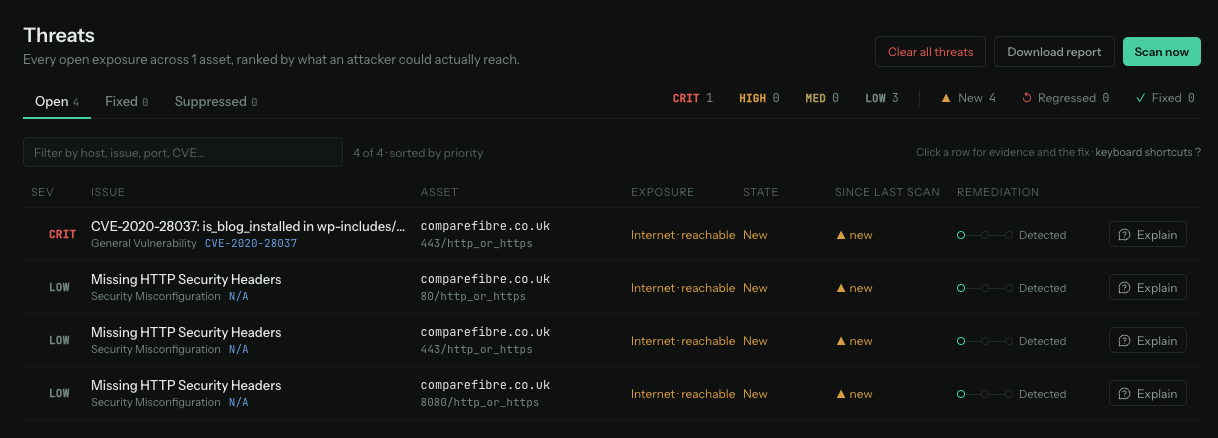
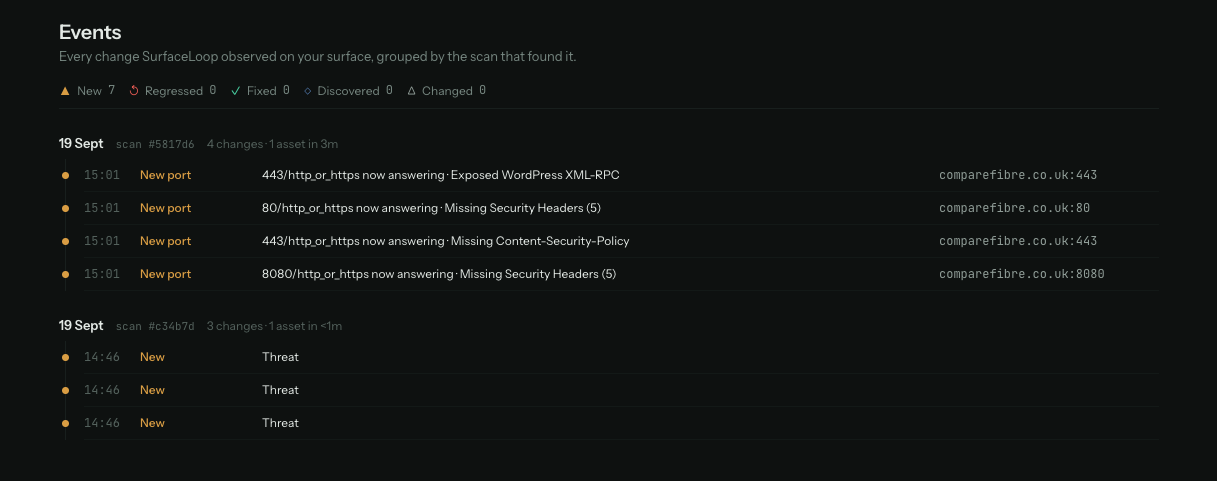
Results are ranked by severity so the critical exposures surface first. Each finding explains what it is, why it matters, and how to fix it — no raw scanner output to decode. Every scan is compared with the last, so you see what opened, what closed, and what changed, with history to prove fixes happened.
- Ranked by severity
- What, why, and how to fix
- Change tracking & fix history
05 / 05
You hear about changes without watching a dashboard
When something new appears on your attack surface, alerts go where your team already works — email, Slack, or webhooks, configured per severity. A full REST API exposes every scan result if you want findings in your own tooling.
- Email, Slack, webhooks
- Per-severity routing
- Full REST API

SurfaceLoop09:14
New critical finding on staging.example.com -- Jenkins dashboard accessible without authentication.
{ "event": "finding.opened", "severity": "critical", "host": "staging.example.com" }
Critical
Slack + email
High
Medium
Weekly digest
Getting started
See it on your own domains before you pay anything
-
01
Start your trial
Tell us your domain and work email — that's the whole signup. No card details, no sales call.
-
02
Your workspace is set up
We provision your trial and discovery starts on your domains — usually within one working day. Login details arrive by email.
-
03
14 days of real findings
Full product on your own estate: every scan category, alerts, change tracking. Nothing to install, no firewall changes.
-
04
Decide
Walk away during the trial and you pay nothing. Continue, and your plan starts at £149/month on a 12-month agreement, invoiced by AMVIA — you'll confirm the terms in writing first.
The fastest way to understand it is to see your own estate
Full product free on your own domains for 14 days. No card details, no sales call.